
Datum Locker0.1.13 - Download
You'll be able to download in few seconds.
Publisher Description
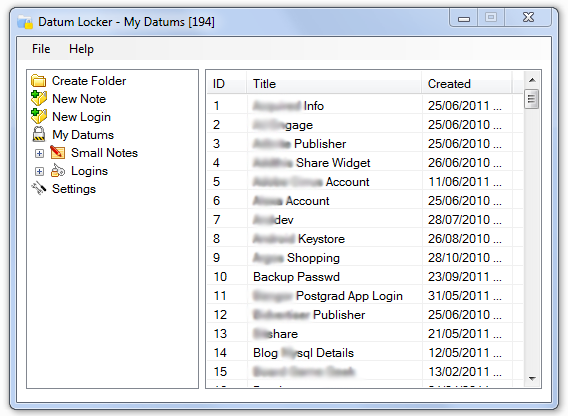
Datum Locker assists safe record keeping of account credentials and note taking which are deemed sensitive. Its strength comes from the use of Nullox's linearistic distance cryptographic (LDC) algorithm to securely store your data on disk thereby presenting an intruder with random symbols due to the omittance of a valid key.
Datum Locker operates on a timer thus monitoring when the application becomes idle, such a time will result in the application locking and docking on to the system tray.
Be safe from PC intruders and store your data on disk in an unreadable state with the Datum Locker.
Feature Set:
Auto dock next to system clock on lock down and pop-up via click
Backend data structure resides in memory encrypted resultant from user defined key
Configurable time-span interval for self locking mechanism and clipboard pruning
Copy credential fields into memory temporarily and jump to URLs for quick web logins
Folder filters to divide datum entries
Importing and exporting of datum collection functionality
Nullox's linearistic distance cryptographic algorithm (LDC)
Password generation for uppercase, lowercase, numeric and symbolic characters
Random and omitted character semantics for any intruder with a mismatched key
Sort datums by title and creation date/time
Support for unicode (other non-latin alphabets)
About Datum Locker
This Encryption Tools program is available in English. It was last updated on 29 September, 2026. Datum Locker is compatible with the following operating systems: Windows.
The company that develops Datum Locker is Nullox Software. The latest version released by its developer is 0.1.13.
The download we have available for Datum Locker has a file size of N/A. Just click the green Download button above to start the downloading process. The program is listed on our website since 2011-07-26 and was downloaded 0 times. We have already checked if the download link is safe, however for your own protection we recommend that you scan the downloaded software with your antivirus. Your antivirus may detect the Datum Locker as malware if the download link is broken.
How to install Datum Locker on your Windows device:
- Click on the Download button on our website. This will start the download from the website of the developer.
- Once the Datum Locker is downloaded click on it to start the setup process (assuming you are on a desktop computer).
- When the installation is finished you should be able to see and run the program.
Program Details
System requirements
Download information
Pricing
Version History
version 0.1.13
posted on 2011-07-26
0.1.13 - 26th July 2011. . - Fixed glitch with clipboard timer mechanic. - Fixed tab ordering for new note data entry input. - Made program align to the center on relaunch from a prior dock. - Updated information in about box dialog. - [Note] .Net Framework 3.5 to 4 transition.
version 0.1.12
posted on 2010-07-15
Added backup and restore functionality, clipboard prune configuration option, changed note and login icon metaphors.
Disclaimer
External Download
We do not host Datum Locker on our servers. We did not scan it for viruses, adware, spyware or other type of malware. This app is hosted by the software publisher and passed their terms and conditions to be listed there. We recommend caution when installing it.
The external download link for Datum Locker is provided to you by apps112.com without any warranties, representations or guarantees of any kind, so access it at your own risk.
If you have questions regarding this particular app contact the publisher directly. For questions about the functionalities of apps112.com contact us.
